26.11.2026
Extract frames from video by API - scene detection, blank-frame skipping and a free contact sheet
Turn MP4, MOV, WebM, MKV or AVI files into still images in one API call - evenly spaced, every N seconds, at exact timestamps, at scene changes or at keyframes. Real runs, the output with timecodes, and how blank frames and long shots are handled.
Thumbnails for a video catalogue, screenshots for a report, stills for an AI vision model, a quick look at what is in a 3-hour recording - all of these need the same step: get the right frames out of a video as images. This post shows a tool that does it in one call, with five ways to choose the frames. Every output below is from real runs on 26 November 2026.
Disclosure: I built the tool, Video Frame Extractor on Apify. The code is open: AndriyVK/-apify-document-tools.
One call
from apify_client import ApifyClient

client = ApifyClient("<YOUR_APIFY_TOKEN>")
run = client.actor("ai_admin/video-frame-extractor").call(run_input={
    "sources": [{"url": "https://api.apify.com/v2/key-value-stores/FloomuI2DrQCJazY8/records/sintel-trailer-480p.mp4"}],
    "mode": "scenes",
    "skipBlankFrames": True,
    "contactSheet": True,
})
for item in client.dataset(run["defaultDatasetId"]).iterate_items():
    for frame in item["frames"]:
        print(frame["timecode"], frame["url"])
    print(item["contactSheetUrl"])
What came back
The video is the trailer of the open movie Sintel (52 seconds, 854 x 480). In scene mode the tool found 7 scenes and returned one frame for each, with its timecode, a link to the image and a contact sheet of all of them:
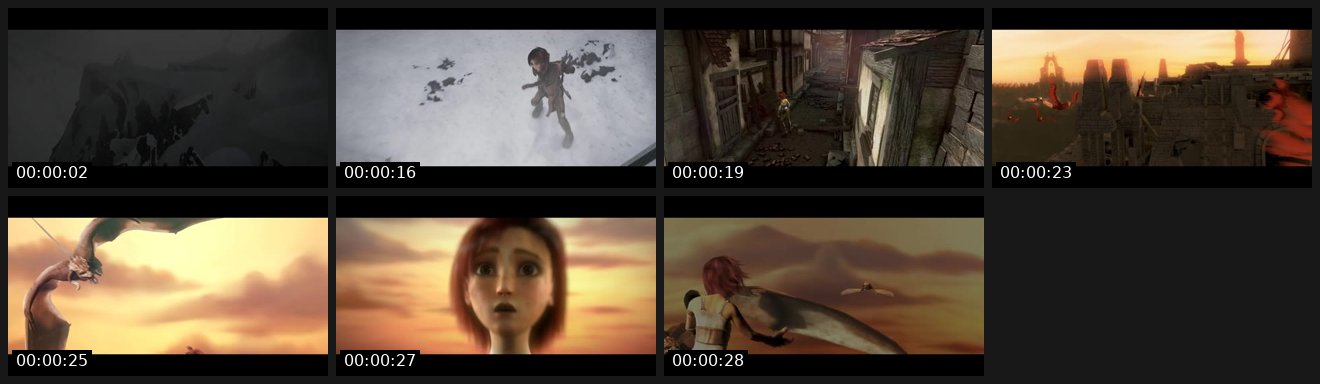
Sintel, (c) Blender Foundation, durian.blender.org, CC BY 3.0.
Each record also carries the video details: length, size, frame rate and codec. One frame from the output:
{
  "index": 2,
  "time": 16.5,
  "timecode": "00:00:16.500",
  "key": "0001-sintel-trailer-480p-00002.jpg",
  "url": "https://api.apify.com/v2/key-value-stores/.../records/0001-sintel-trailer-480p-00002.jpg"
}
The scene changes match the reference: ffmpeg's own scene filter at the same threshold finds the cuts at the same moments.
Five ways to choose frames
| Mode | What you get | Good for |
|---|---|---|
count |
N frames spread evenly over the video | a preview, a thumbnail grid |
interval |
a frame every N seconds | long recordings, monitoring |
timestamps |
frames at the exact times you give | screenshots of known moments |
scenes |
one frame per scene change | a storyboard, input for AI vision |
keyframes |
the video's own keyframes | fast extraction from long files |
Any mode can be limited to a part of the video with startTime and endTime. In a run on a 3-minute 1080p video,
interval every 10 seconds between 00:30 and 01:30 returned exactly 7 frames, at 30, 40, ... 90 seconds.
The details that save you time
- Blank frames are skipped, and the scene is kept. Fade-ins, black inserts and flat-colour frames are not useful
as thumbnails or for AI. With
skipBlankFramesthe tool takes a frame a moment later in the same scene instead. On the Sintel trailer that turned three black frames into real pictures (at 2, 19.5 and 28.7 seconds), and a test video that fades in from black gives its first frame at 0.7 seconds instead of losing the scene. The check is free. - Long shots get a clear hint. An interview, a lecture or a screen recording has no hard cuts. In scene mode such
a video still returns its frame, with a note to lower
sceneThresholdor switch tointerval. - Contact sheet for free. One image with all frames and their timecodes, to check a video at a glance.
- Formats. MP4, MOV, WebM, MKV and AVI in; JPG, PNG or WebP out, with an optional maximum width.
- Clear errors, no charge. If a link fails or every frame in a video is blank, you get an error that says why, and that video is not charged.
Price
You pay per saved frame: $0.002 on paid plans, $0.0025 on the free plan, plus $0.001 per started minute of video analysed in scene mode. The contact sheet and the blank-frame check are free. A fair price, with no hidden extras: the 7 scene frames of the Sintel trailer above cost $0.015.
Ideas
- Thumbnails and previews for a video library, a course or a marketplace.
- Frames for AI vision: describe a video, find products or text in it, check content - send the scene frames to a vision model instead of the whole file. The tool is also an MCP tool for Claude, Cursor and other agents - see MCP server for document and media tools.
- Storyboards of ads and trailers, one frame per scene.
- Reports: screenshots of exact moments of a recording, with timecodes.
What would you extract frames for first? Tell me in the comments.
Try it in two minutes
- Open Video Frame Extractor and press Try for free.
- The input is already filled with a working example: press Start, or put in links to your own videos.
- Apify's free plan includes $5 of usage every month - enough to test it on your own data.